
Box Office (SaskTix)

SASKTIX BOX OFFICE HOURS:
Please note that SaskTix Box Office hours may vary depending on scheduled events and unforeseen circumstances.
Regular Hours
- Tuesday to Friday: 12:00 PM – 4:00 PM
Concert Days
- 12:30 PM – 9:00 PM
WHL Moose Jaw Warriors Games
- 6:00 PM game: 12:00 PM – 7:30 PM
- 7:00 PM game: 12:00 PM – 8:30 PM
AAA Winmar Warriors Games
- Opens 1 hour before puck drop.
Closed Mondays
P: (306) 624-2050
ABOUT US:
SaskTix is a full-service regional ticketing provider based in Moose Jaw Saskatchewan with it's head office located within the Temple Gardens Centre and serves as a local alternative for all live entertainment, sport, cultural ticketing and registration needs. SaskTix offers affordable ticketing services to regional venues and events including arenas, performing arts, theatres, convention & exhibition halls, universities and other local events and attractions.
Powered by Paciolan, Paciolan's mission is to be the worldwide leader of event technology and client services, by partnering with event promoters and facility-based entertainment organizations, and provide them with affordable tools for ticketing, reservations, access control, online commerce, and related financial transactions.
These innovative management tools empower their clients to communicate with their patrons effectively, generate additional revenue, reducing expenses, and expand all forms of audience development. Paciolan powers ticketing, fundraising and marketing technology solutions for over 500 organizations across North America in five primary markets including college athletics, performing arts, arenas and professional sports. Paciolan is also the industry leader in regional ticketing platform development.
The City of Moose Jaw like Prince George, Red Deer, Penticton, Kelowna, and Kitchener (among others) who have established a regional brand that can extend ticketing and marketing services to a wide variety of entertainment, cultural and tourism facilities.
Paciolan’s platform is flexible enough to scale up to support major venues and events, and can be configured to support smaller venues and operations with the most basic ticketing and registration needs.
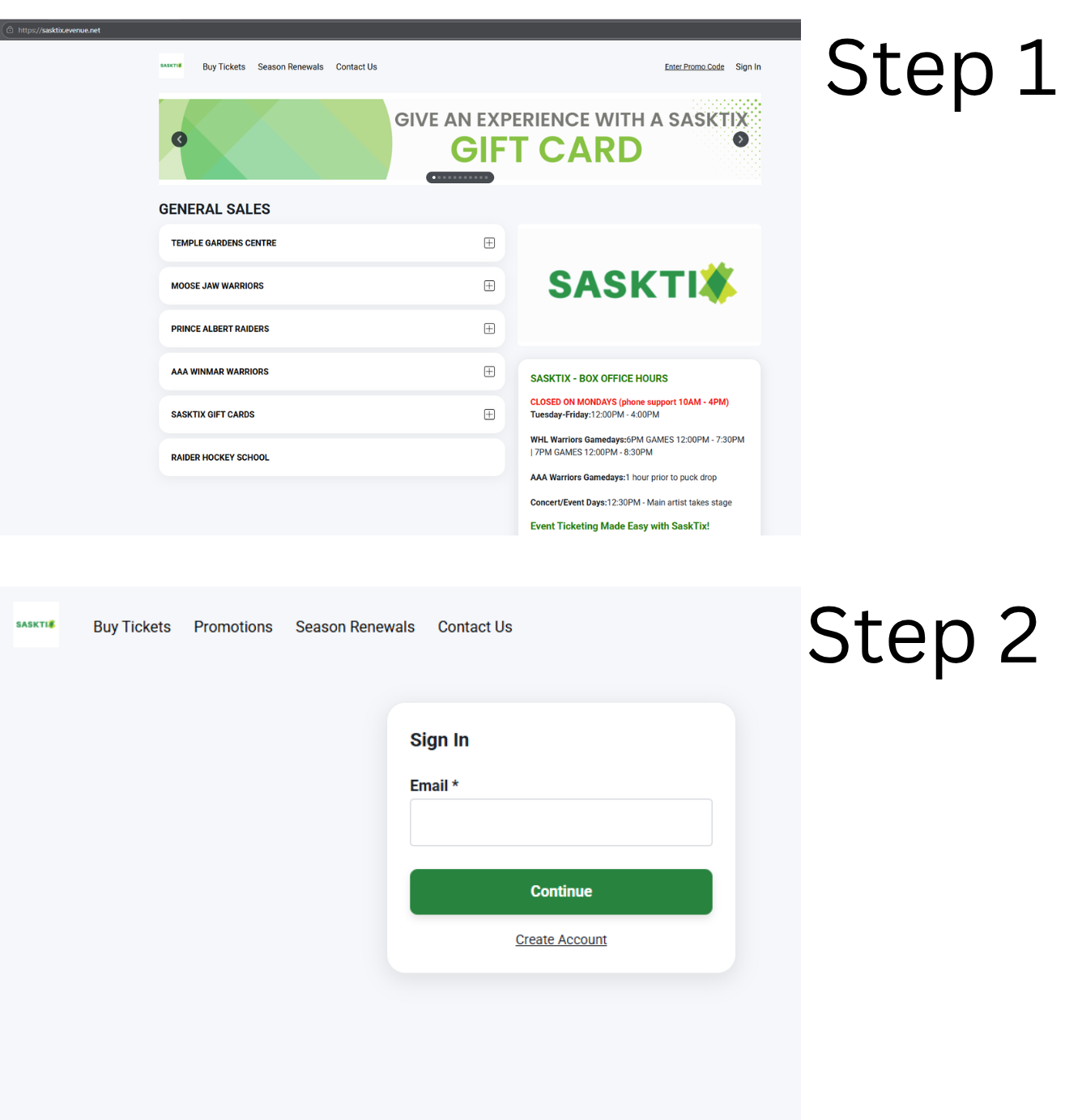
Signing into your account
Step 1: Go to SaskTix.ca.
Step 2: Click "Sign In" at the top of the page.
- If you already have an account, enter your email address and password to log in.
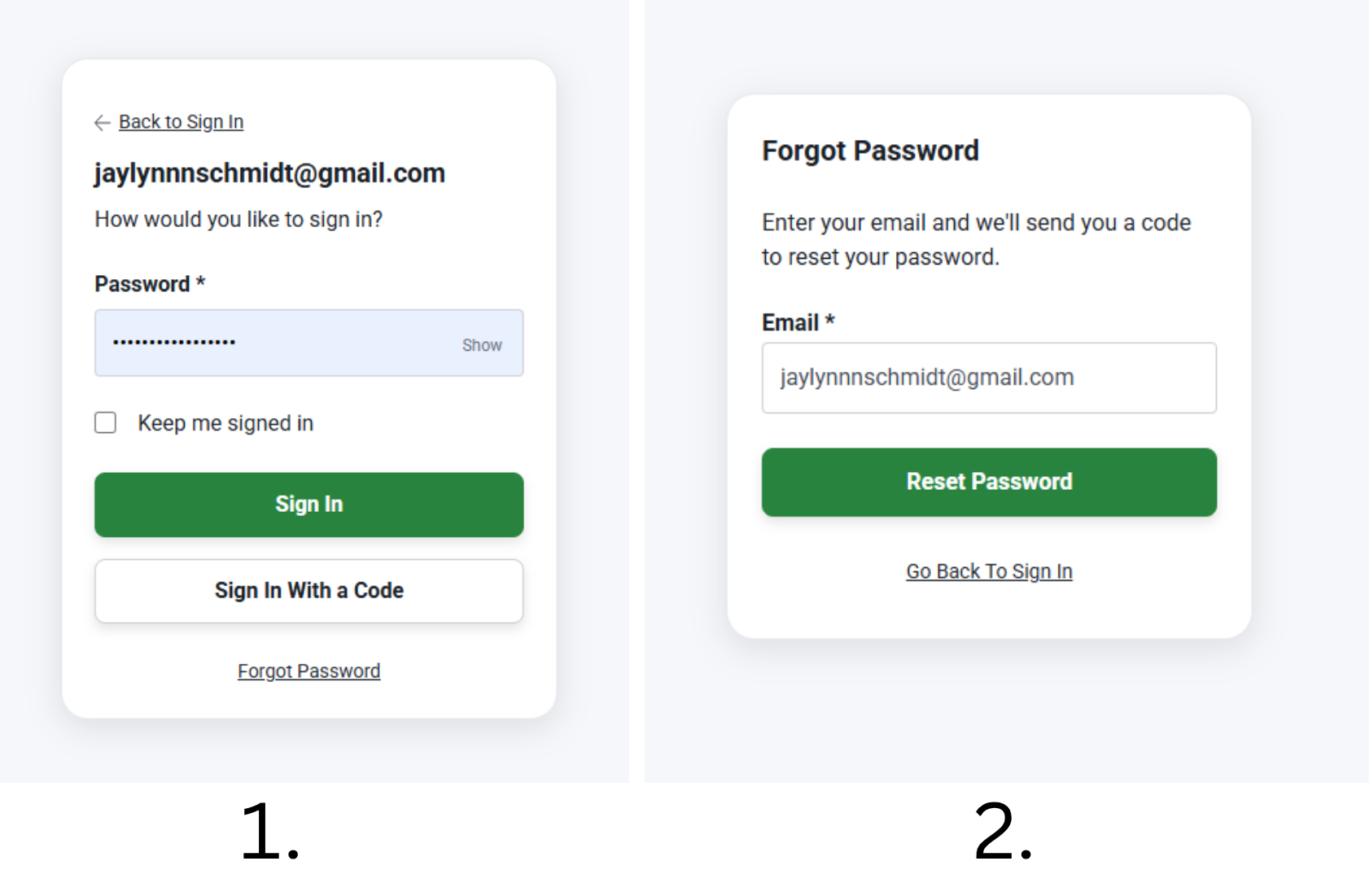
- You can also click "Sign In with a Code." A code will be sent to the email address you enter. Use that code to sign in.
- If you forgot your password, click "Forgot Password?" and follow the instructions to reset it.
Creating your account
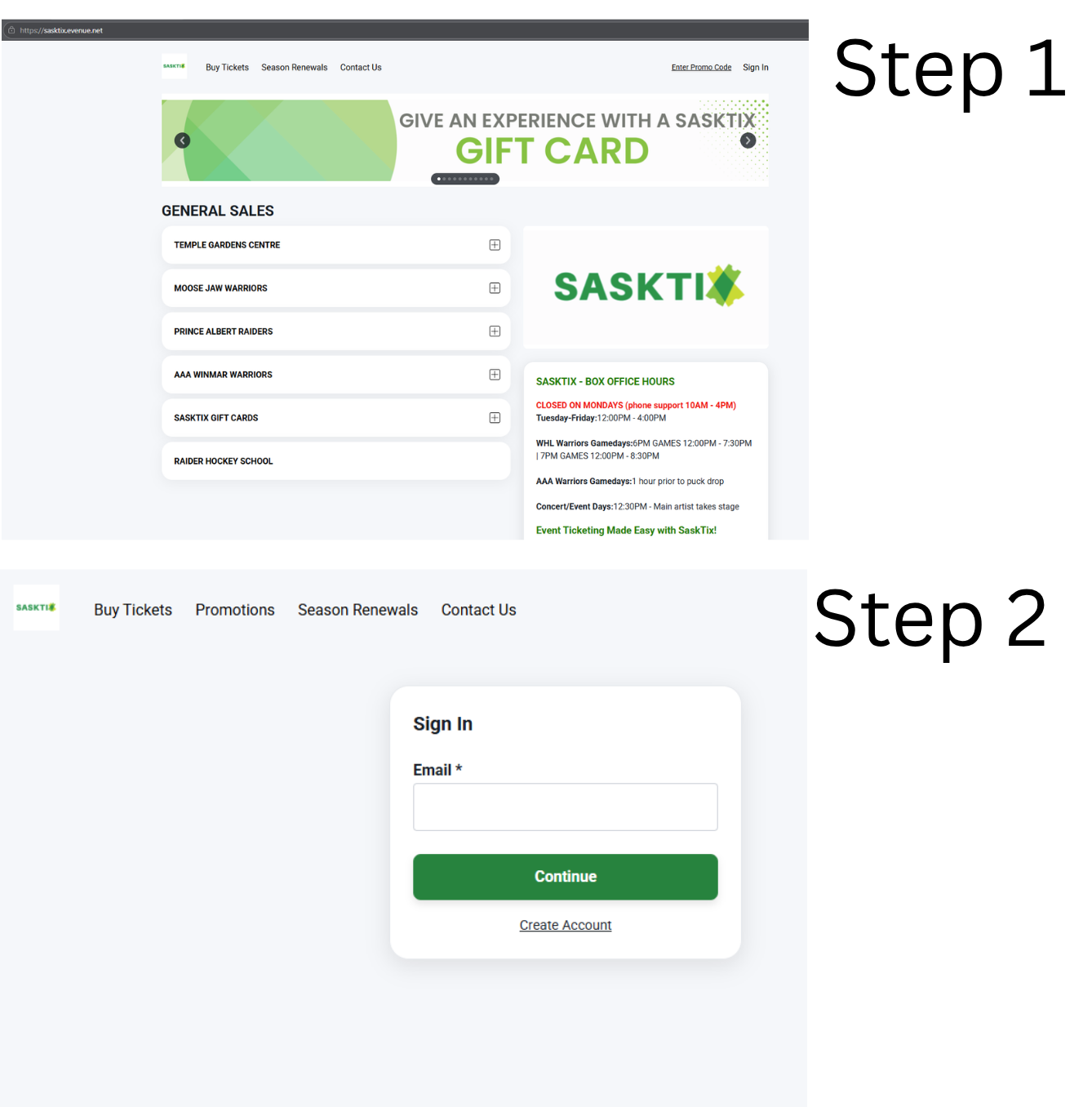
Step 1: Go to SaskTix.ca.
Step 2: Click “Sign In”, then select Create Account.
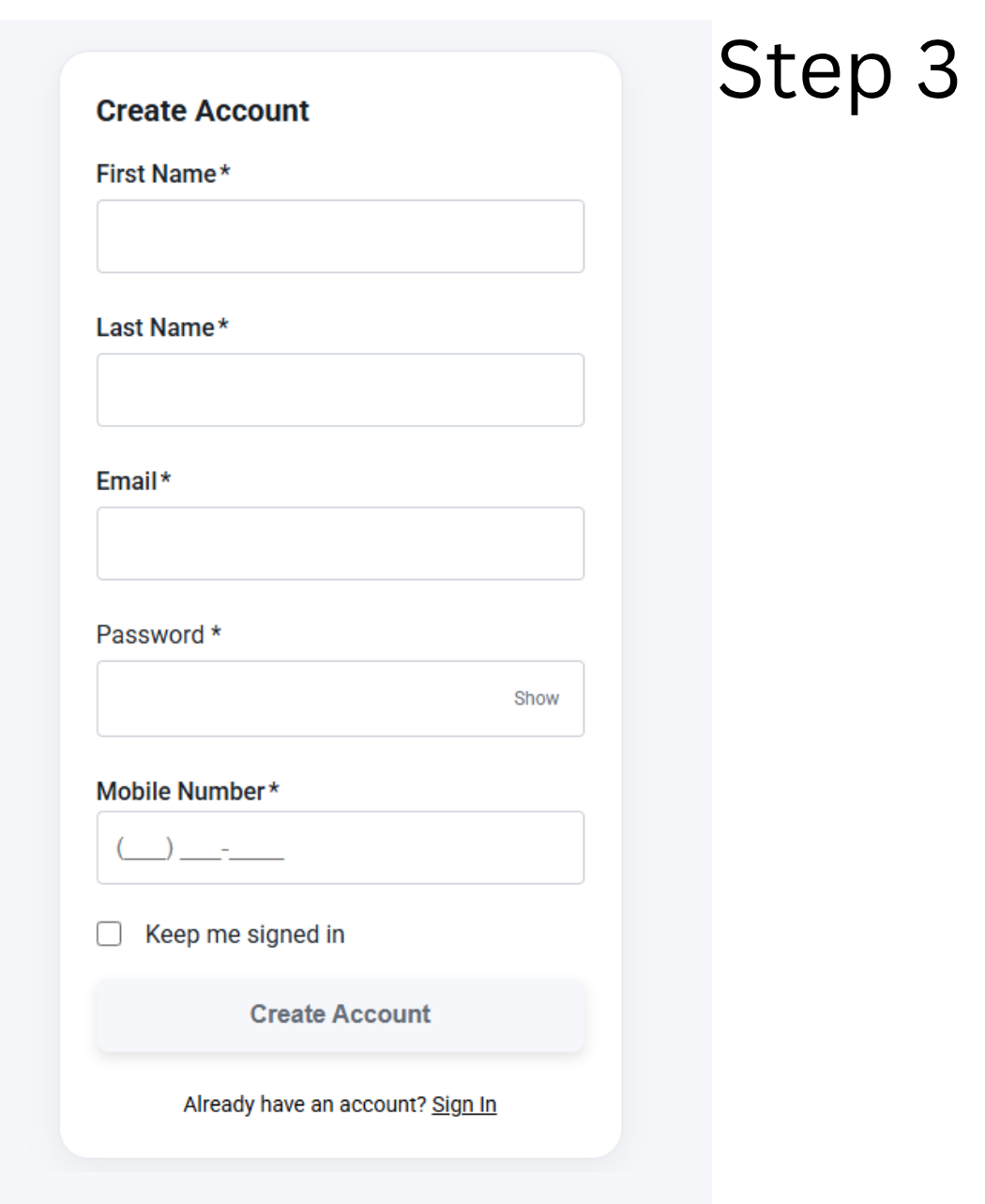
Step 3: Enter your:
- First Name
- Last Name
- Email Address
- Password
- Mobile Number
Once all the information is filled in, click "Create Account" to finish setting up your account.
Mobile Tickets
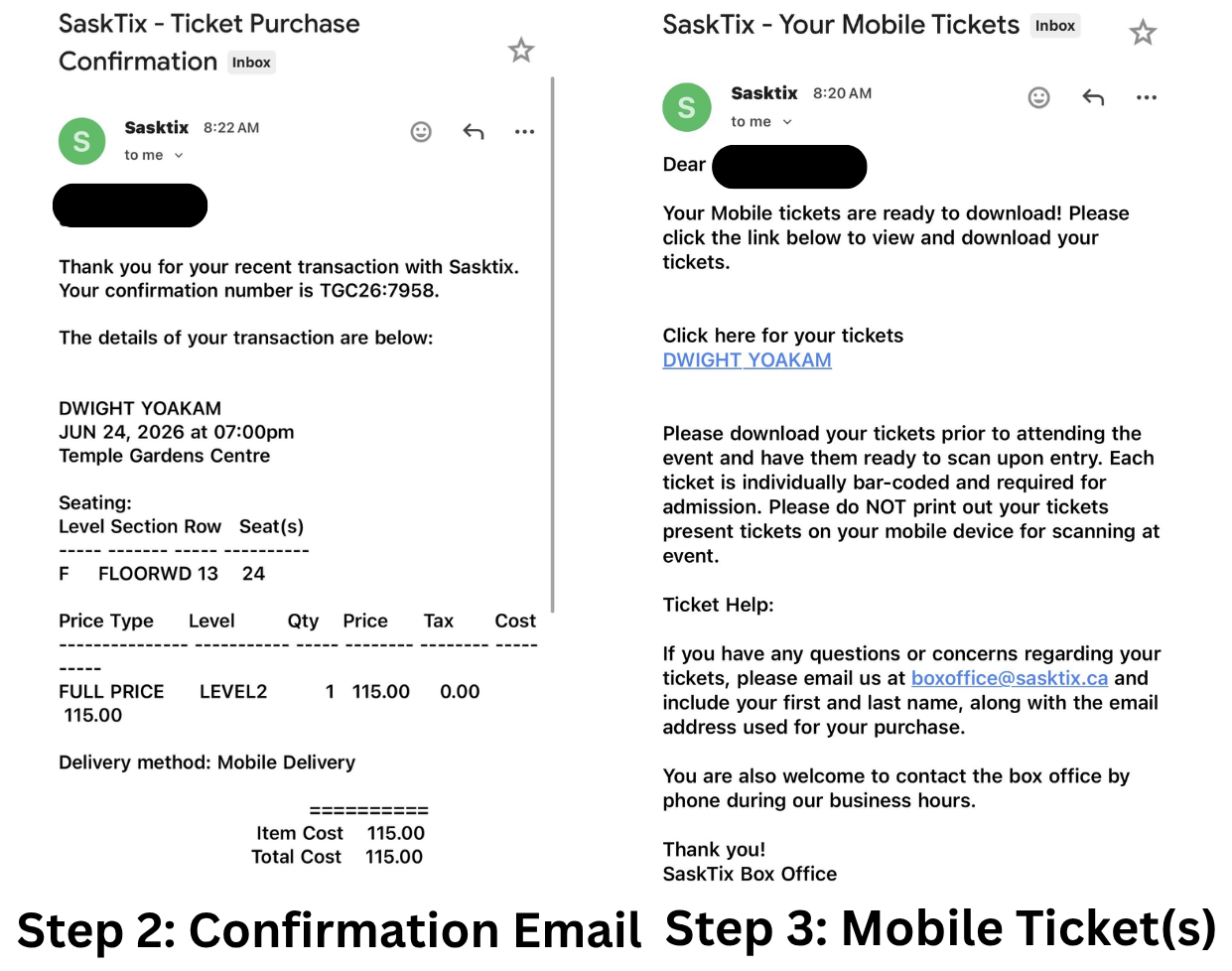
Step 1: Make sure you have either Apple Wallet (iPhone) or Google Wallet (Android) installed on your phone.
Step 2: After purchasing your tickets, you will receive two emails from SaskTix:
- An order confirmation email.
- An email containing your mobile ticket(s).
Step 3: Open the mobile ticket email and click "Click Here for Your Tickets."
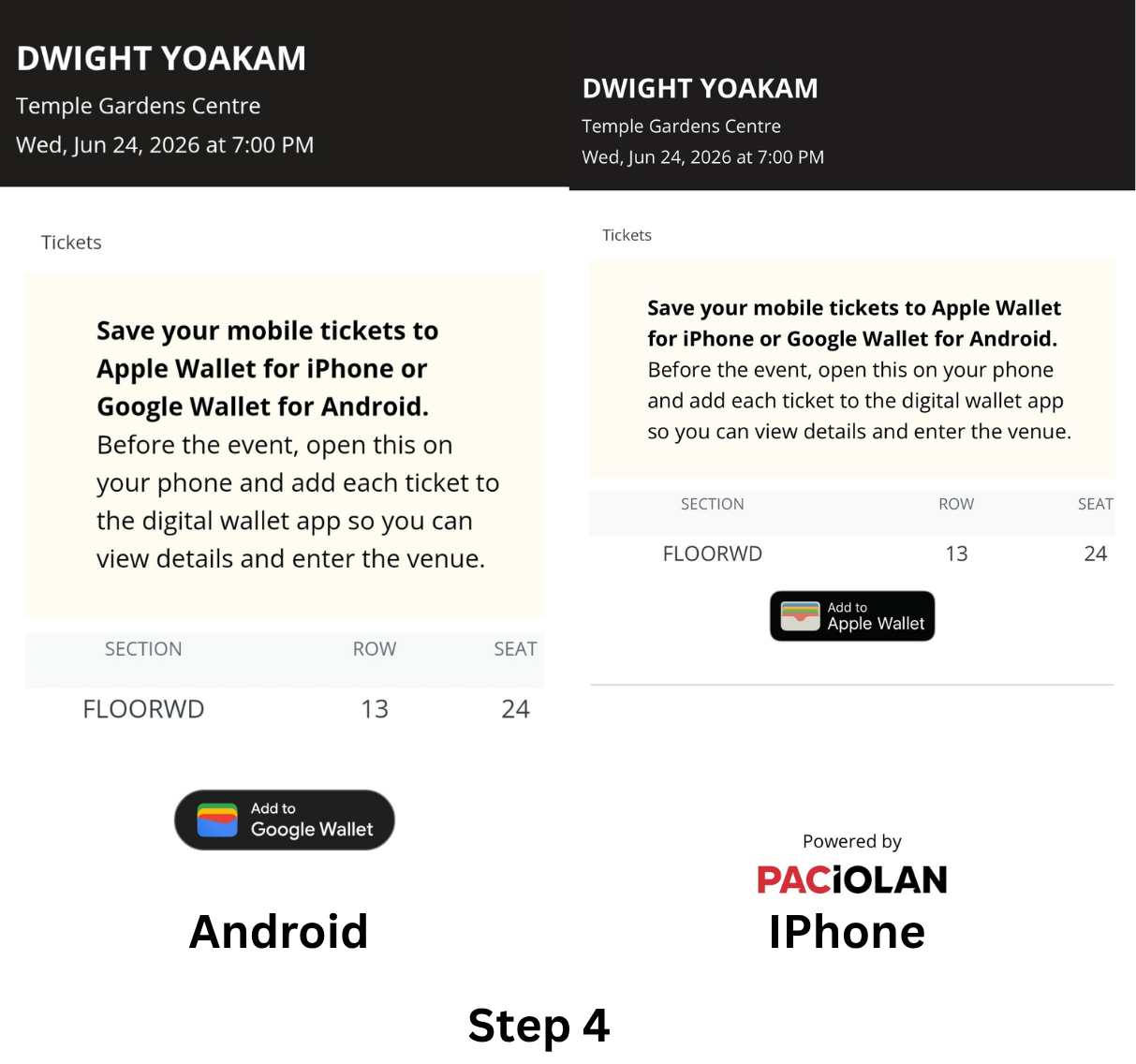
Step 4: On the ticket page, select "Add to Apple Wallet" or "Add to Google Wallet" at the bottom of the screen.
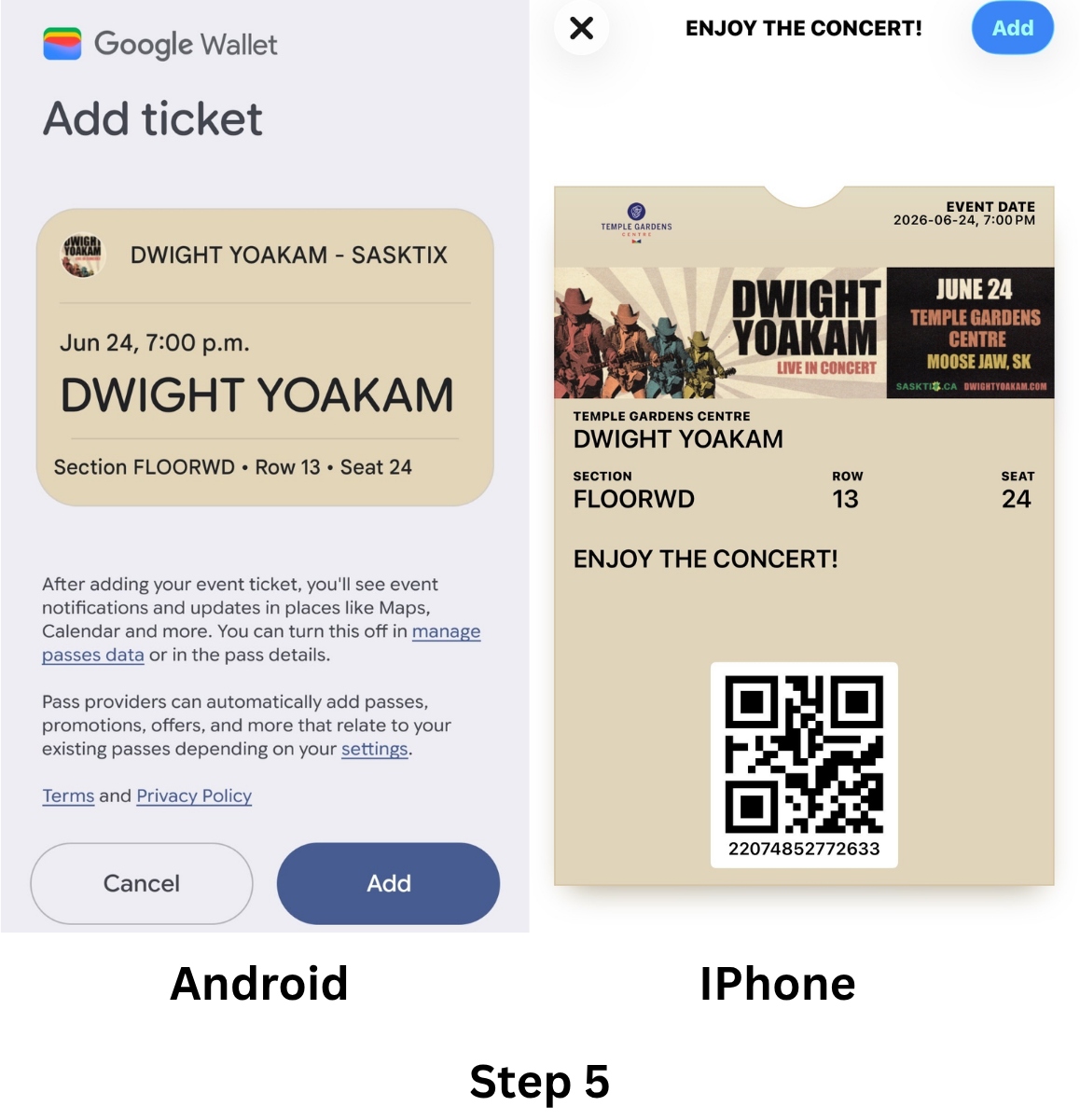
Step 5: Your wallet app will open.
- Apple Wallet users: Tap "Add" in the top-right corner.
- Google Wallet users: Tap "Add" in the bottom-right corner.
Important
- Please add your mobile ticket(s) to your wallet as soon as possible. The ticket link will expire after a period of time. If the link expires before you add your tickets, you will need to contact us to have the mobile ticket(s) resent and repeat the process above.
Transferring Tickets
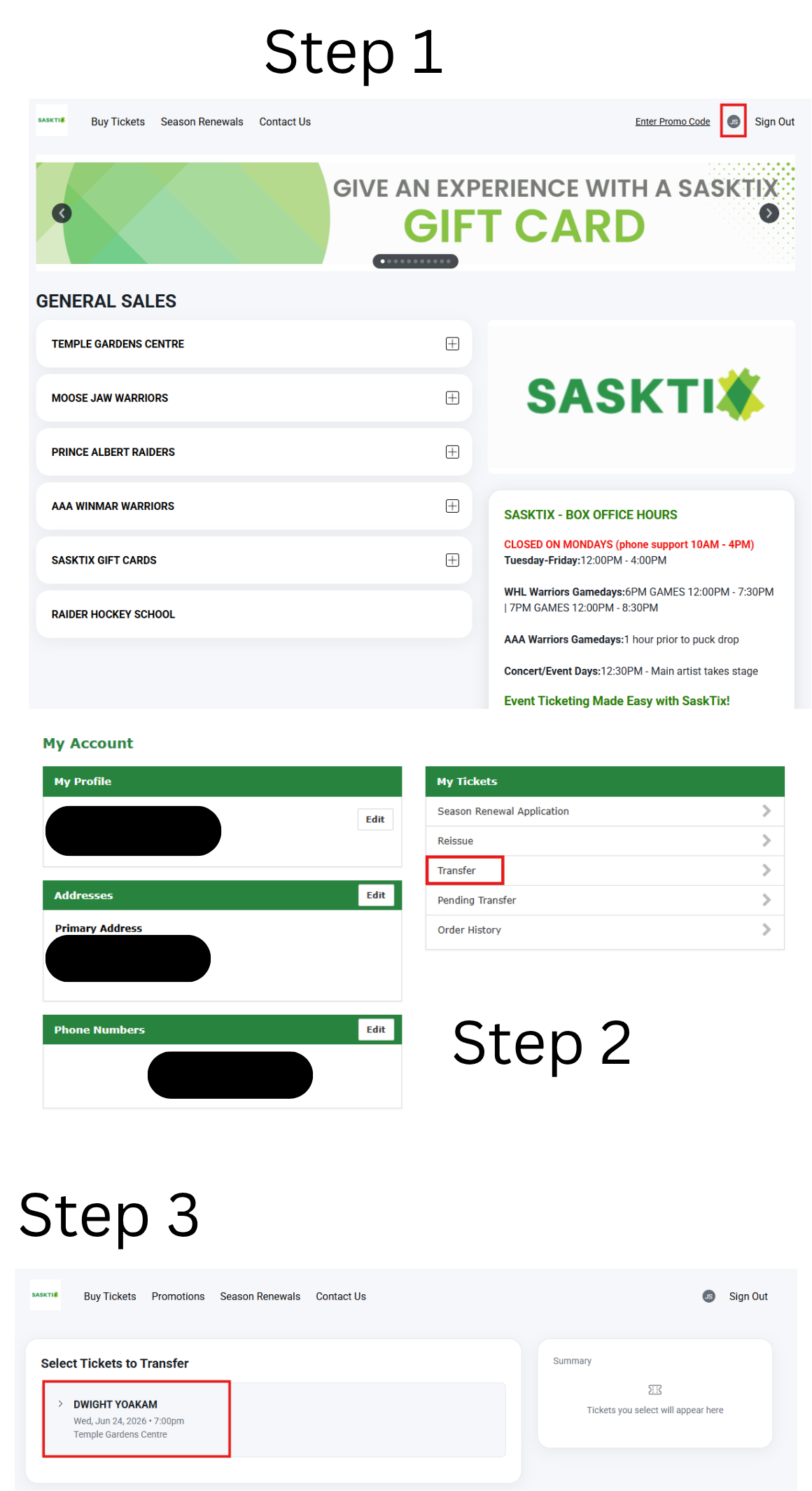
Step 1: Log in to your SaskTix account.
- Once you're signed in, click on your initial in the top-right corner of the page and select "My Account."
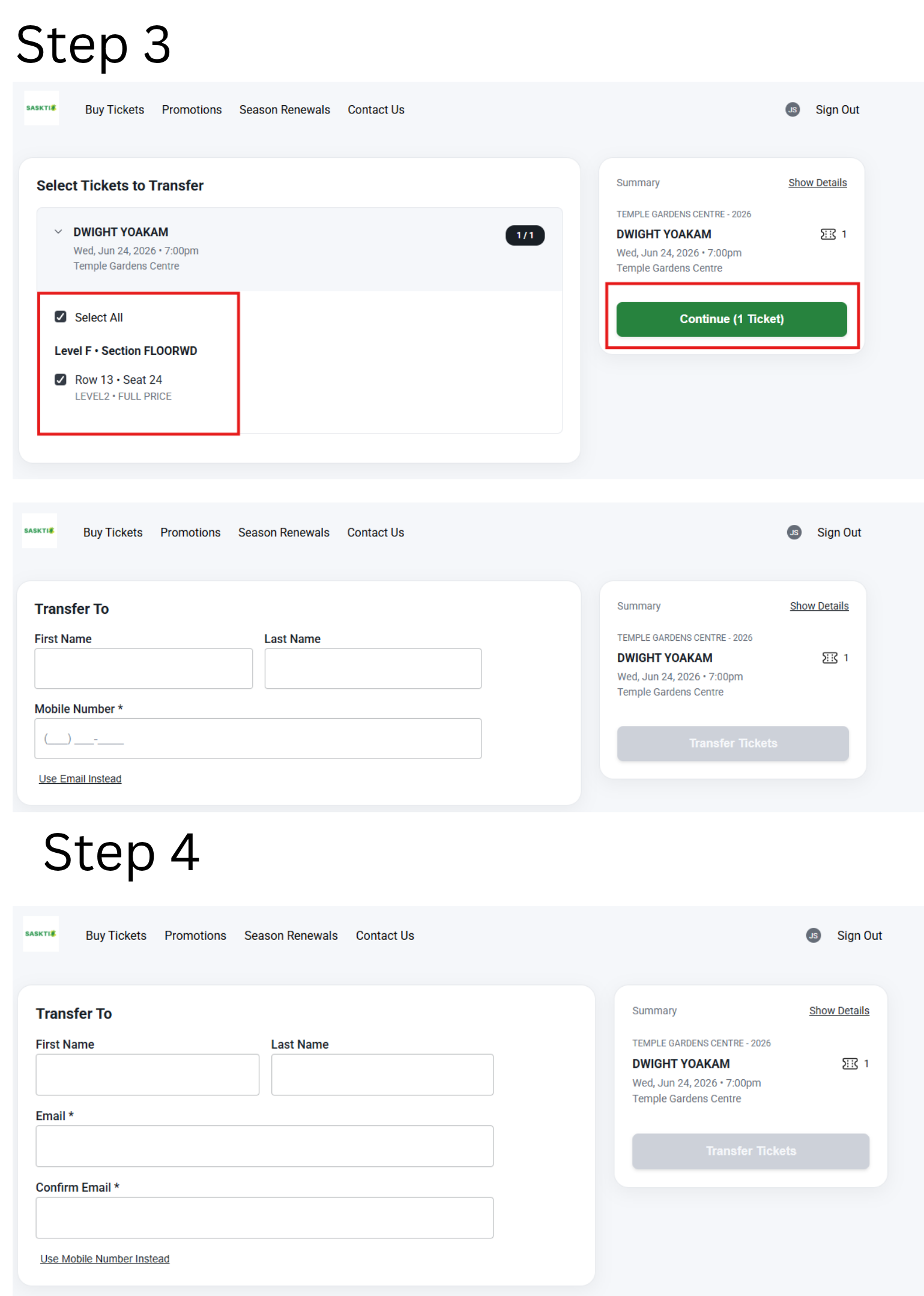
Step 2: Transfer your ticket(s).
- Click "Transfer."
- Select the ticket(s) you want to send.
- Enter the recipient's first name, last name, and either their email address or mobile phone number.
- Click "Transfer" to send the ticket(s).
Important: The person receiving the ticket(s) must have a SaskTix account. They will need to either create an account or log in before they can accept the transfer.
Step 3: Log in to your SaskTix account.
- Click your initial in the top-right corner of the page.
- Select "My Tickets."
- Click "Pending Transfers" to view any ticket(s) that have been sent to you.
Step 4: Accept the transfer.
- Once accepted, add the ticket(s) to your Apple Wallet or Google Wallet for easy access on event day.
Why does my mailing address show as incorrect
- The mailing address you enter must match the address associated with your payment method. If the addresses do not match, our system may flag the transaction as potential fraud and prevent the purchase from being completed.
- If you live in a newly developed area, your address may not yet be recognized by the system. In this case, please contact the Box Office so we can update your mailing address.
The website won't let me purchase a ticket
- If you live outside of Saskatchewan or your purchase is being made from a different province, our system may flag the transaction for security reasons.
- If this happens, please contact the Box Office for assistance with your purchase.
Why can't I purchase a specific seat
There can be several reasons why a seat is unavailable.
- One common reason is that selecting the seat would leave a single empty seat between purchased seats. To help maximize seating availability, our system does not allow purchases that would leave one seat isolated.
- If you're unsure why a seat cannot be selected, please contact the Box Office for assistance.
Can I print my mobile ticket and use the paper copy to enter the event
- No. Mobile tickets are digital tickets and must be scanned from your phone at the event entrance.
- If you would prefer a printed ticket, please contact the Box Office. We can print your ticket for you; however, you will need to present valid photo ID when picking it up so we can verify ownership of the ticket.
Wil my child need a ticket
Ticket requirements vary by event, so we recommend contacting the Box Office to confirm the policy for your specific event.
General guidelines:
- Temple Gardens Centre events: Children 2 years old and under typically do not require a ticket, provided they sit on a parent's or guardian's lap.
- WHL Moose Jaw Warriors games: Children 4 years old and under typically do not require a ticket, provided they sit on a parent's or guardian's lap.
- Policies may vary by event, so it's always best to check in advance by contacting the box office.
What is a Family Pack and what does it include
A Family Pack includes:
- 2 Adult tickets
- 2 Child tickets
- 4 Pop vouchers
- 4 Popcorn vouchers
- The pop and popcorn vouchers are issued as printed tickets and must be picked up before entering the event.
- For WHL Moose Jaw Warriors games, Family Packs are no longer available once the arena doors open. For most 7:00 PM games, sales typically end around 6:00 PM.
What forms of payment do you accept online / in-person / over the phone
Online Payments:
- Visa
- Mastercard
- American Express
- Apple Pay
- Google Pay
In-Person or Over-the-phone payments:
- Cash
- Debit
- Visa
- Mastercard
- American Express
- SaskTix Gift Cards
- SaskTix Gift Cards
How do I purchase a SaskTix Gift Card
- Gift cards can be purchased online or in person.
- Online: Follow the instructions on the SaskTix website to complete your purchase.
- In Person: Visit the Box Office during regular business hours.
- Once purchased online, your gift card can either be:
- Picked up at the Box Office, or
- Mailed to the address listed on your SaskTix account.
How do I check my Gift Card balance
You can check your gift card balance here: https://wwws.givex.com/merchant_balcheck/20289_en/
What can I purchase with a SaskTix Gift Card
SaskTix Gift Cards can be used for:
- Concerts
- Special events
- Hockey games and other ticketed events sold through SaskTix
- Concessions and bar purchases at the Temple Gardens Centre
What happens if I purchase a resellers ticket
Ticket resellers are not recognized ticket agents of Temple Gardens Centre or The Moose Jaw Warriors. Guests purchasing tickets from a private reseller, intentionally or not, risk being refused entry to Temple Gardens Centre events. To avoid problems with counterfeit, stolen or voided tickets, Guests should make your purchases through our only authorized ticket partner.
The resale of tickets ("scalping") is against the law and will not be permitted in and around the property of Temple Gardens Centre. Violators will be reported to the Moose Jaw Police Department.